Work calls
A Granola alternative for answering live, not just taking notes
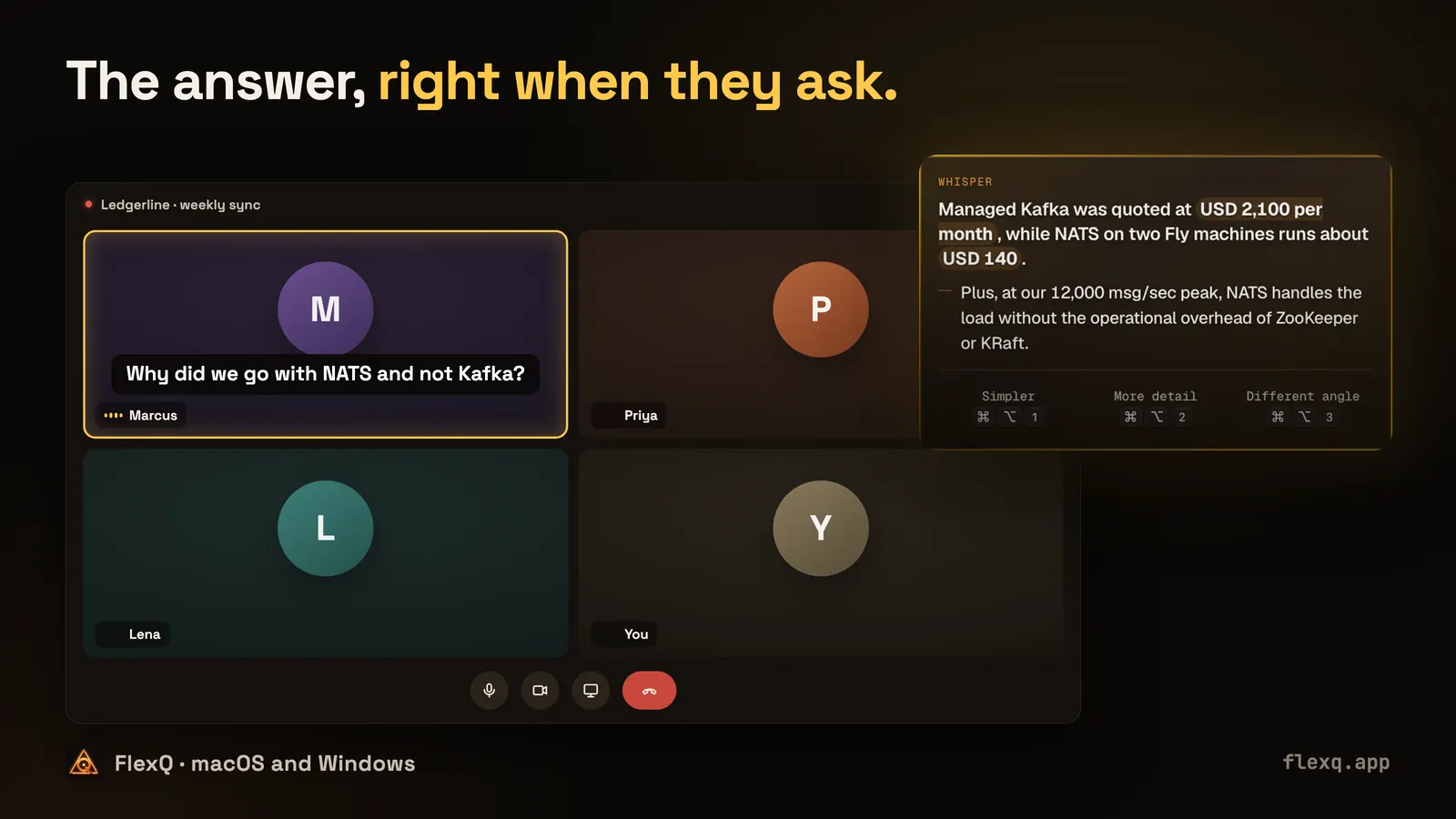
AI notetakers like Granola, Otter and Fireflies are built for after the call: a summary, action items, notes you can search. If what you actually need is the answer while someone is asking, that's a different job. FlexQ is a real-time AI meeting assistant for macOS and Windows. It listens on your computer and, when someone asks you a question, shows a short cue from your project folder. You answer in your own words.
Facts prepared by your coding agent. Tested with Claude Code and Codex.
Notes after the call, or an answer during it
| AI notetaker | FlexQ | |
|---|---|---|
| When it helps | After the call | During the call, while you answer |
| What you get | Summary, action items, searchable notes | A short cue with the fact you need |
| Where the knowledge comes from | What was said on the call | Your project folder, prepared by your coding agent |
| After the call | Notes to read and share | Notes handed to your agent, which proposes doc changes as a diff |
Many people will want both. FlexQ is not a replacement for meeting notes; it covers the moment a question lands.
Where the answers come from
FlexQ doesn't guess from the conversation. Your coding agent (tested with Claude Code and Codex) reads the project's code and docs and writes a short facts file into .flexq/context: exact values, dates, owners, and the reasons behind decisions, each with its source. FlexQ reads that file during the call. When a question isn't covered, the cue says so instead of making something up. How to write that facts file.
No bot in the meeting
FlexQ listens to the call audio on your own computer. Nothing joins as a participant, so it works with Zoom, Google Meet, Teams or any other call app without an integration.
Who switches
Engineers, tech leads, PMs and consultants who run projects through coding agents and get asked about the details on status calls, design reviews and client calls. See how it works on the AI meeting assistant page.
Privacy, plainly
Live audio is sent to transcription providers during the call. With a linked project folder, each cue is written from excerpts, not whole files, from the text documents in that folder (README, docs, status and planning files), your brief and the notes kept in .flexq/context, the codebase summary if you built one, and the titles and summaries of recent meetings in that project. The codebase summary is built only when you start it. Building it sends source files from the folder to Gemini; the summary itself stays on your device. With a linked project, that is the only time source code is sent. If you use a folder on a call without linking a project, FlexQ sends files from that folder, documents first and then source code and configuration files, up to a fixed size limit.
The app skips files excluded by .gitignore (in a Git repository) and files that look like secrets, such as .env files, keys and credentials. Your context documents and project files are not kept on our servers. In the app downloaded from flexq.app, call transcripts are saved to your account by default; switch this off in Settings anytime. Your coding agent reads the repository itself and sends what it reads to its own provider, as in your daily work. The full details are in the privacy policy.
FAQ
What is a good Granola alternative for developers?
If you need answers during the call rather than notes after it, use a real-time assistant that reads your project, like FlexQ. It shows a cue from facts your coding agent prepared.
Is FlexQ an Otter or Fireflies alternative?
For live answers on work calls, yes. For transcripts and summaries to share after the call, a notetaker is the better fit.
Does FlexQ join the meeting?
No. It listens on your computer, so no bot appears in the call.
Does it work with Zoom, Google Meet and Teams?
Yes. It listens to call audio on your computer, so no integration is needed.
Does my source code leave my machine?
With a linked project, source code is sent only when you build the optional codebase summary. For each cue, FlexQ sends excerpts, not whole files, from the text documents in your project folder (README, docs, status and planning files), your brief and the notes kept in .flexq/context, the codebase summary if you built one, and the titles and summaries of recent meetings in that project. Building the codebase summary sends source files from the folder to Gemini; the summary itself stays on your device. The app skips files excluded by .gitignore and files that look like secrets, such as .env files, keys and credentials. Your context documents and project files are not kept on our servers. Your coding agent reads the repository itself and sends what it reads to its own provider, as in your daily work.
Does it work on Windows?
Yes. A Windows build ships with every release; it isn't code-signed yet, so Windows shows a warning on first run.
Try it on your next call
For macOS or Windows.
More
FlexQ for work calls · AI meeting assistant for work calls · CLAUDE.md / AGENTS.md guide · All guides · Download FlexQ