Download
FlexQ is downloading…
Your .dmg should be saving now. Click here if it didn't start.
FlexQ is a desktop app for Mac and Windows. Drop your email — the download link will be waiting when you're back at your computer.
The whole path again
Common mistakes
- Running FlexQ.exe from inside the .zip. Windows can't start it from there. Right-click the .zip → Extract All, then open the new FlexQ folder.
- Only a Don't run button? Click More info first. Run anyway appears after that.
- Browser blocked the download? Open your downloads list and choose Keep.
Still stuck? Email contact@flexq.app. We answer within a day. Or grab 15 minutes and we'll set you up together.
Install on your Mac
Requires macOS 13 Ventura or newer on Apple Silicon or Intel. The same .dmg works on both; earlier macOS versions are not supported.
When the download finishes:
- Open the downloaded .dmg and drag FlexQ into Applications.
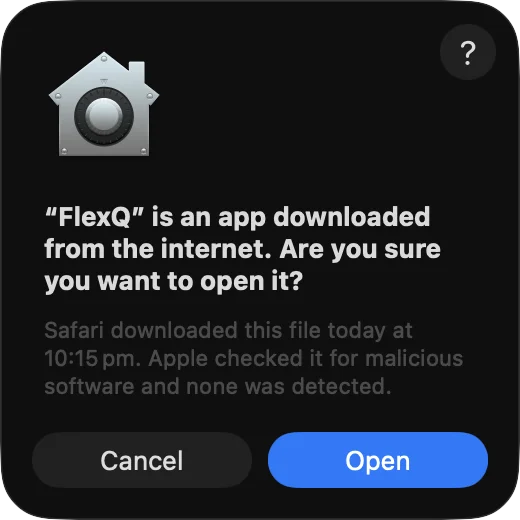
- Open FlexQ from Applications. macOS asks if you're sure you want to open an app downloaded from the Internet. Click Open.
- FlexQ opens. Sign in with the same email.
- When FlexQ asks, allow Microphone and Screen Recording (called Screen & System Audio Recording on later Sonoma updates and on macOS 15 and later). FlexQ links you to the right System Settings page.
On Intel Macs the first launch can take up to a minute while macOS checks FlexQ. Double-click once and wait for the Open prompt.
Permissions and fixes, step by step: Mac setup guide.
Not installed yet?
Download againThe whole path again
Common mistakes
- Opening FlexQ from the .dmg window. Drag it into Applications first and open it from there.
- Clicked Cancel? Open FlexQ from Applications again and click Open.
- FlexQ can't hear you or the other side? In System Settings, allow FlexQ under Microphone and Screen Recording (Screen & System Audio Recording on later Sonoma updates and on macOS 15 and later). If FlexQ still can't hear, quit it and open it again.
- Seeing “Apple could not verify FlexQ”? That file is from an older download. Download FlexQ again from this page and open the new copy.
- FlexQ can't be opened, or nothing happens on an Intel Mac? macOS may still be checking it. Wait about a minute; if it stays stuck, restart the Mac, or run in Terminal:
xattr -dr com.apple.quarantine /Applications/FlexQ.app && open /Applications/FlexQ.app
Still stuck? Email contact@flexq.app. We answer within a day. Or grab 15 minutes and we'll set you up together.
Other versions: Windows 10+, x64 (.zip)
Stuck? Email contact@flexq.app — we answer within a day. Or grab 15 minutes and we'll set you up together.
On a different computer? Open flexq.app/download there — it hands you the right build for that machine.
Using FlexQ on work calls? How the AI meeting assistant works